Remote desktop for the MacYour Mac, from any screen you own.

Punte lets you see and control your Mac from an iPhone, an iPad, another Mac, a Windows PC or an Android device. The picture goes straight from your Mac to your device, over your home network or your own VPN. No cloud, no accounts.

punte /ˈpun.te/ · Romanian for a small bridge, the kind that crosses from one bank to the other.

TLS 1.3, both sides authenticated Your network or your VPN Nothing in between
Set up in three steps

Pair once, then connect with one tap.

There is nothing to sign up for. Your devices recognise each other by their own keys, exchanged once when you pair them.

  1. Install Punte Host on your Mac

    A small menu bar app. It asks macOS for the permissions it needs in one window, then listens only while you tell it to.

  2. Pair your device

    Choose Pair New Device… on the Mac, then scan the QR code or type the code. It lasts two minutes and works once.

    K7QX–M4RD
  3. Connect

    Tap Connect and your Mac's screen appears, with its sound. Your touches, trackpad and keyboard control it.

See it

It's your Mac, just on another screen.

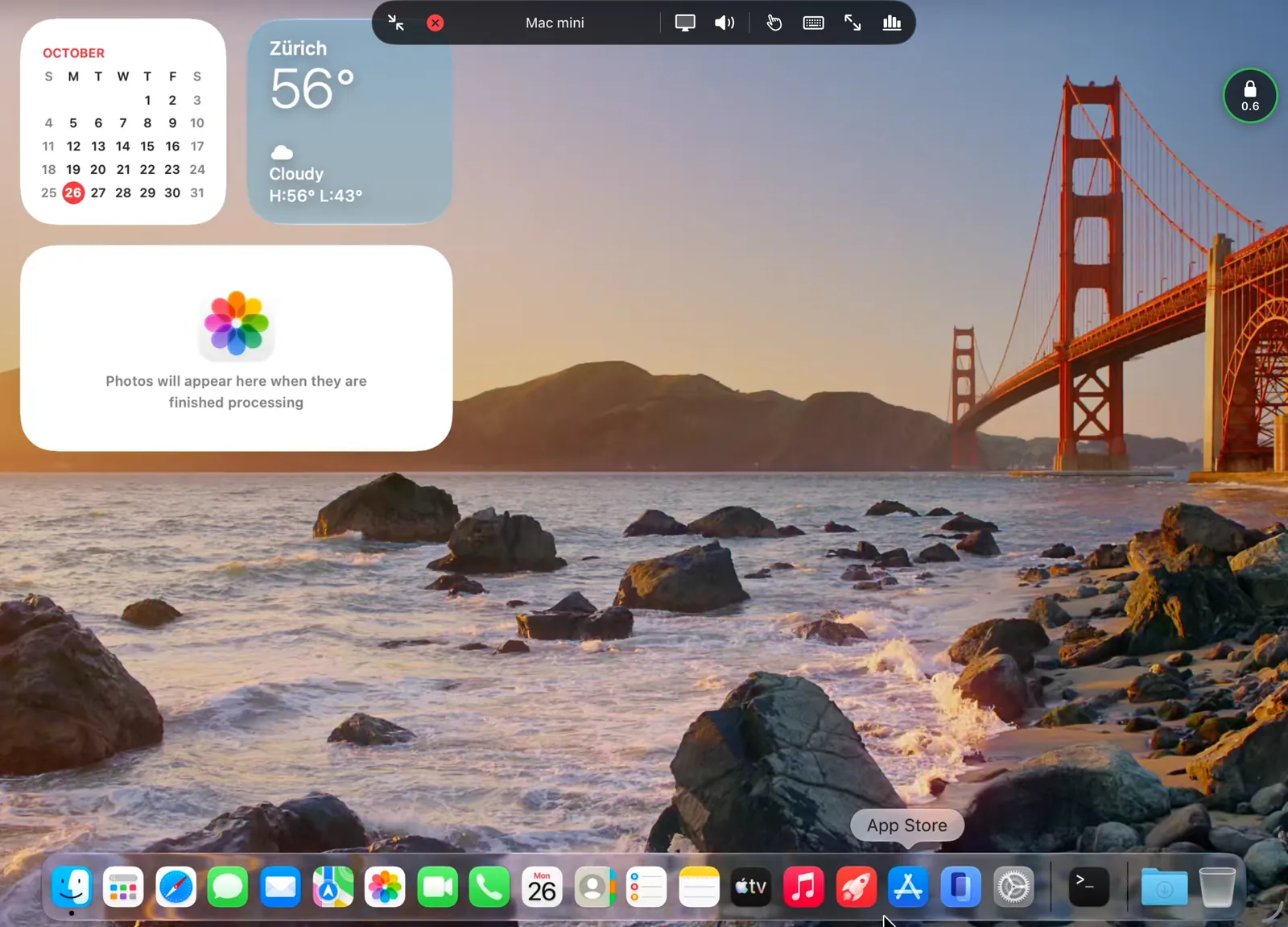
Your desktop, your apps, your files, as they are on the Mac. The controls fold into a small ball at the edge, out of the way.

A Mac's desktop on an iPad, with Punte's controls bar open at the top and the connection ball at the right edge
On iPad, with the controls open.
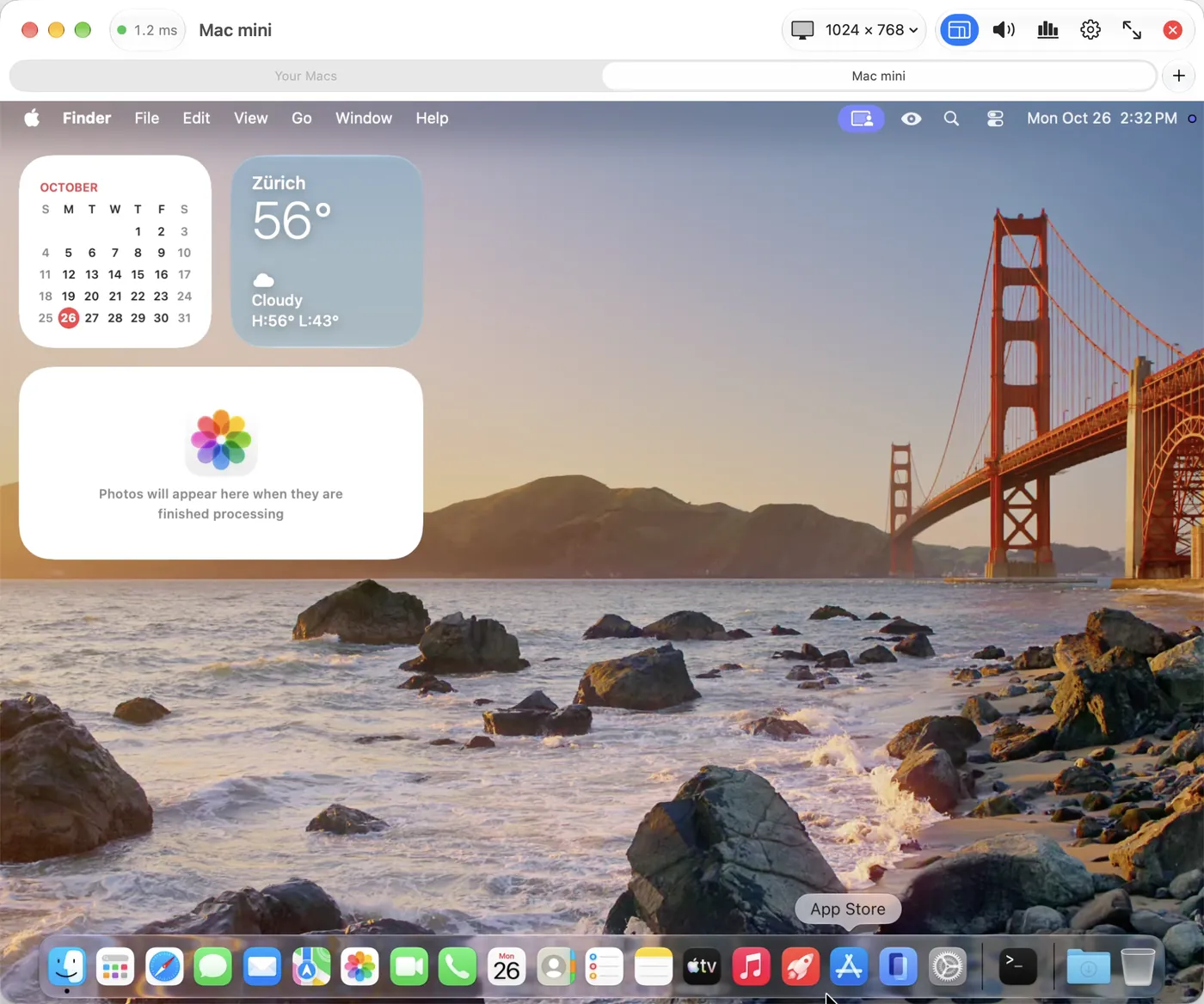
Punte for Mac showing another Mac in a window tab, with the connection bar at the top
Mac to Mac, in a tab of its own.
Features

Made for reaching a Mac, and only a Mac.

Windows already has a good remote desktop. The Mac didn't, so Punte does one thing: it brings your Mac to every other screen you use.

Unlock a locked Mac

When your Mac is locked, sign in through macOS's own Screen Sharing, carried inside Punte's encrypted connection.

A display that fits your device

Pick a resolution made for your screen, Retina sizes included. The Mac always switches back when you leave.

Smooth and light

Hardware HEVC or H.264 at 30 fps by default, 60 fps when you want it, with a bitrate that adapts to your network.

Sound and clipboard

Hear your Mac. Copy on one side, paste on the other, text and images, in both directions.

Your keyboard, your layout

Type the characters your device's layout makes, even on a Mac set to another one. Or send physical keys.

Private by design

Mutually authenticated TLS 1.3 with pinned identities, keys in the Secure Enclave, and no server anywhere.

No cloud

Between your devices, and nowhere else.

Most remote desktops route you through their servers and ask you to make an account. Punte has neither. Your device connects to your Mac's address on your network, or through a VPN you already run.

0

servers

No relay, no sign-in service, no update ping. Nothing has to stay online for Punte to keep working.

0

accounts

No email, no password with us. Pairing is a code on your Mac's screen, compared by you.

0

trackers

No analytics or advertising code in the apps. This website asks before it measures anything.

1.3

TLS, always

Both ends prove who they are with keys pinned at pairing. A different key is refused, with no "continue anyway".

Two apps

One for the Mac you reach. One for everything you reach it from.

Punte Host

Mac App Store · Punte Host: Mac Remote Access

Runs in the menu bar of the Mac you want to reach. Free.

  • Listens only between Start and Stop, never in the background on its own
  • Approves each new device by name and fingerprint
  • Shows when a device is connected, with Disconnect All one click away
  • Optional limits: allowed networks, idle timeout, approve every connection

Punte

App Store and Microsoft Store · Punte: Remote Desktop for Mac

The app you connect from, on iPhone, iPad, Mac, Windows and Android. Free to try, with Punte Pro as a one-time purchase.

  • Every saved Mac with its own quality, sound, input and keyboard options
  • Several Mac displays, with a picker
  • On the Mac and Windows: tabs, windows and full screen
  • Optional Face ID, Touch ID or passcode lock
Platforms

Reach your Mac from what's in your hand.

The Mac is always the one you connect to. Every other device connects to it.

iPhone

iOS 26 or later. Direct touch or trackpad mode, folded and unfolded on iPhone Duo.

App Store

iPad

iPadOS 26 or later. Pointer lock with a trackpad or mouse, Apple Pencil, hardware keyboards.

App Store

Mac

macOS 26 or later. One Mac controls another, in tabs or windows. Same purchase as on iPhone and iPad.

App Store

Windows

Windows 11. Tabs, full screen, and your PC keyboard's characters on the Mac.

Microsoft Store

Android

Android 10 or later. Phones and tablets.

Coming to Google Play

The Mac you reach needs macOS 26 or later and Punte Host.

Pricing

Free to use. Pay once if you want more.

No subscription. Punte Pro is a single purchase that removes the limits.

Punte Host · on the Mac
Free
  • Everything the Mac side does
  • Any number of paired devices
Punte · free
€0
  • Every feature
  • Sessions up to 10 minutes; reconnect any time
  • One saved Mac
Questions

Remote desktop for Mac, answered

How do I control my Mac from my iPad or iPhone?

Install Punte Host on the Mac and Punte on your iPad or iPhone. On the Mac, choose Pair New Device… and scan the QR code or type the code on your device, approve it on the Mac, then tap Connect. Your Mac's screen appears with its sound, and you control it by touch, trackpad or keyboard.

Can I access my Mac from a Windows PC?

Yes. Punte for Windows 11, from the Microsoft Store, opens your Mac in a window or full screen, with its sound, the clipboard both ways and your PC keyboard's characters.

Does Punte work over the internet?

Punte connects directly to your Mac's address, so it works on your home network and from anywhere through a VPN you already run, such as WireGuard or Tailscale. It has no relay servers of its own, by design.

Do I need an account?

No. There is no sign-up and no server. Your devices recognise each other by keys exchanged once, when you pair them.

Can I unlock my Mac remotely when it's locked?

Yes. When the Mac is locked, Punte hands over to the Mac's own Screen Sharing, carried inside Punte's encrypted connection, so you can sign in from your device. You turn this on in Punte Host's settings.

Is Punte free?

Punte Host on the Mac is free. The Punte app is free with sessions of up to 10 minutes and one saved Mac. Punte Pro is a one-time purchase, €14.99 on Apple for iPhone, iPad and Mac together, for sessions of any length and any number of Macs.

How is Punte different from macOS Screen Sharing or VNC?

Punte is made for reaching a Mac from other kinds of devices. It fits the Mac's resolution to your screen, streams hardware-encoded video with sound, handles touch, trackpads and keyboard layouts, and opens no VNC port on your network.

Download

Start with the Mac, then add your devices.

On the Mac you want to reach

Punte Host is free.

On the device you connect from

Store links open here when the listings go live.